📌 이 글은 Docker & 배포 자동화 시리즈 중 하나입니다.
회사 프로젝트는 셋팅 된 값들이 많아서
build.sh로 스크립트 기반 빌드 시스템으로 되어있었다.
또한 svn으로 형상관리를 하고 있었다.
svn으로 형상관리를 하는 경우
svn 계정을 Jenkins에 연동해야 한다.
Svn 계정 등록
#Jenkins browser > Jenkins 관리 > Plugins
Available plugins 탭을 클릭한 뒤

Subversion Plug-in을 받아준다.
Dashboard> Jenkins관리 > Creditials> System > Global credentials 에
svn 계정의 아이디와 비밀번호를 등록해준다.
새로운 item 을 등록할 때, 혹은 configuration 할 때
소스코드 관리 부분에서 Subversion을 체크한 뒤
Credentials에서 등록한 계정을 선택하면 된다.

스크립트 기반 빌드
Jenkins browser에서 +새로운 Item을 누른다.

이름을 지정한 후에(프로젝트 이름)
Freestyle project를 클릭하고 ok를 누른다.
구성에서 소스관리 코드에서
Repository URL을 입력하고,
Credentials에 등록한 계정을 선택해준다.
Local module directory는 .으로 그대로 두면
/var/lib/jenkins/workspace/<프로젝트명>위 경로로 svn checkout 될 것이다.
또한, 이미 체크아웃된 파일이 문제가 될 수 있기 때문에, (실제로 에러남 READ ONLY 어쩌구..)
Check-out Strategy를 Always check out a fresh copy로 설정해줬다. (이랬더니 에러 안남)
svn이 commit 되었을 때 자동 빌드 되도록 하려면,
빌드 유발 부분에서
Poll SCM을 체크하고,
cron 형식으로 스케줄을 입력해주면, 주기적으로 SVN 저장소를 확인하여 변경사항이 있을 경우 자동으로 빌드를 해준다.
cron 형식 예시
- H/15 * * * *: 매 15분마다
- H 2,14 * * 1-5: 월요일에서 금요일까지 매일 오전 2시와 오후 2시에
- H 0 * * *: 매일 자정에
Build Steps에서 Execute shell을 선택한 뒤 command를 작성해주면 된다.
#!/bin/bash
svn upgrade

# 빌드 스크립트에 실행 권한 추가
chmod +x ./build.sh

# build.sh 스크립트 실행
./build.sh 8000
svn upgrade를 하지 않았더니 에러가 발생하였다.
svn upgrade는 작업 복사본의 형식을 최신 Subversion 클라이언트와 호환되도록 업그레이드 하는 것이다.
Shell에서 사용할 환경변수 셋팅
build.sh에서는 또 다른 레포지토리의 svn checkout을 하고 있는데,
shell에는 svn 권한이 없기 때문에 문제가 발생했다.
'jenkins'의 암호:svn: E070014: Unable to connect to a repository at URL
위와 같은 에러가 발생했는데,
환경변수 셋팅을 통해 해결할 수 있었다.
build.sh에 문제가 되는 checkout 하는 부분을
svn checkout https://example.com/svn/repo --username "${SVN_USERNAME}" --password "${SVN_PASSWORD}"이렇게 변경해 주고,
item 구성에서
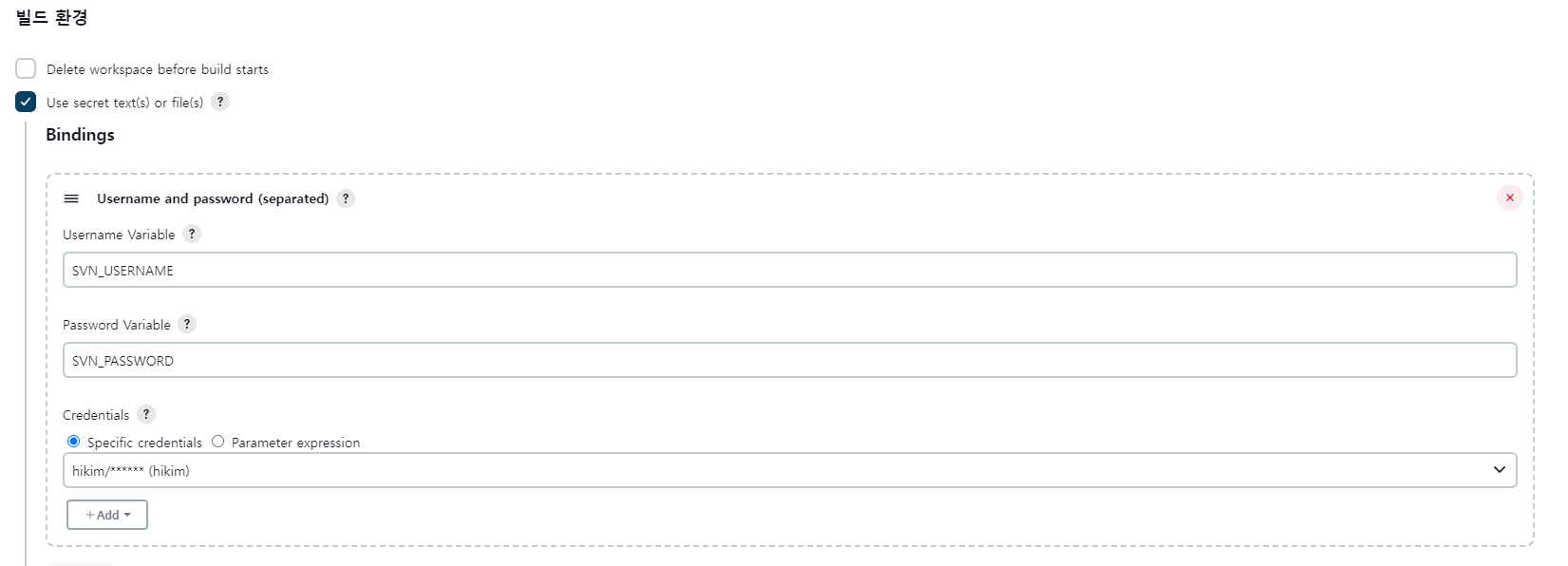
빌드 환경 > Use secret text(s) or file(s)를 체크한 뒤
Bindings add > Username and password (separated)에
Username 변수에는 SVN_USERNAME
Password 변수에는 SVN_PASSWORD
를 한 뒤 credentials에 등록해둔 svn 계정을 선택하면 된다.
모듈의 pom.xml에서 svn 을 체크아웃 하고 있어서,
또 인증 문제가 발생하였다.
build.sh에 명령어에 프로퍼티 값을 넘겨주고,
부모 pom 파일에서 username과 password를 프로퍼티로 정의하고,
이를 자식 모듈에서 참조하도록 할 수 있었다.
build.sh 명령어
mvn clean install -Dusername=${SVN_USERNAME} -Dpassword=${SVN_PASSWORD}
부모 pom.xml
<project xmlns="http://maven.apache.org/POM/4.0.0"
         xmlns:xsi="http://www.w3.org/2001/XMLSchema-instance"
         xsi:schemaLocation="http://maven.apache.org/POM/4.0.0 http://maven.apache.org/xsd/maven-4.0.0.xsd">
    <modelVersion>4.0.0</modelVersion>
    <groupId>com.example</groupId>
    <artifactId>parent-project</artifactId>
    <version>1.0-SNAPSHOT</version>
    <packaging>pom</packaging>

    <properties>
        <svn.username>${username}</svn.username> <!-- 기본값을 정의 -->
        <svn.password>${password}</svn.password>
    </properties>

    <modules>
        <module>module1</module>
        <module>module2</module>
    </modules>
</project>
자식 pom.xml
<project xmlns="http://maven.apache.org/POM/4.0.0"
         xmlns:xsi="http://www.w3.org/2001/XMLSchema-instance"
         xsi:schemaLocation="http://maven.apache.org/POM/4.0.0 http://maven.apache.org/xsd/maven-4.0.0.xsd">
    <modelVersion>4.0.0</modelVersion>
    <parent>
        <groupId>com.example</groupId>
        <artifactId>parent-project</artifactId>
        <version>1.0-SNAPSHOT</version>
        <relativePath>../pom.xml</relativePath> <!-- 상대 경로로 부모 POM을 참조 -->
    </parent>
    <artifactId>module1</artifactId>

    <scm>
        <connection>scm:git:git://${scm.username}:${scm.password}@github.com/example/my-project.git</connection>
        <developerConnection>scm:git:ssh://${scm.username}:${scm.password}@github.com/example/my-project.git</developerConnection>
        <url>http://github.com/example/my-project</url>
    </scm>
</project>

'Backend · Infra' 카테고리의 다른 글
| [Error] No SLF4J providers were found. (0) | 2024.08.06 |
|---|---|
| [Jenkins] pipeline 작성하기 (0) | 2024.08.05 |
| [Jenkins] Linux에 jenkins 설치 2 (0) | 2024.07.29 |
| [Jenkins] Linux에 jenkins 설치 (0) | 2024.07.26 |
| [ElasticSearch] Paging (0) | 2024.07.22 |